ASNETutorial [](https://android-arsenal.com/details/3/921)
============
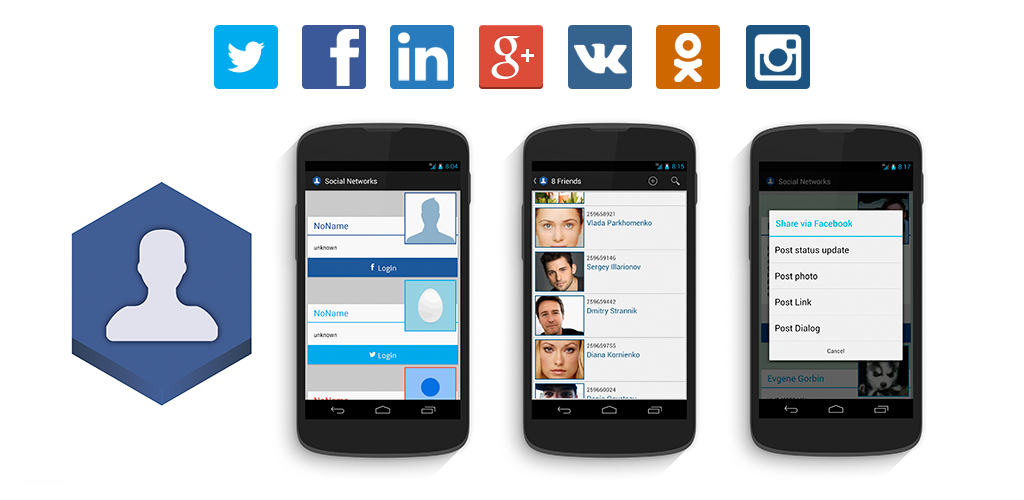
Simple example project for https://github.com/gorbin/ASNE library
Today social network integration to your android application is common practice - it makes user easily login to your app and share their actions. There are a lot of ways to do it - usually developers add native social network SDK or use API for every network. It provides login via installed social network application or native dialogs. You have to spend time and nerves to learn and use different social network SDKs.
What if you need to add one more social network for your application? Sometimes you have to reorganize or redo all your integrations. This leads to idea to create and implement common interface for all social networks. Fortunately there is an open source modular library [ASNE](https://github.com/gorbin/ASNE) that allows you to choose necessary social network and provides full sdk and common interface for most oftenly used requests(login, share, friendslist & etc) It saves your time and simplifies adding another networks in the future. Moreover you can easily add any other social network as new module - the similar way as it's done in other modules.
In this tutorial you can learn how easily integrate Facebook, Twitter in android application using [ASNE modules](https://github.com/gorbin/ASNE). This is very basic tutorial with login, sharing link and showing friends list.
##Registering app - getting keys for your application
In order to implement Social networks in your application you need keys to make API calls. So register a new social network application and get the keys. Check small tutorial how to get it:
- [Facebook](https://github.com/gorbin/ASNE/wiki/Create-Facebook-App)
- [Twitter](https://github.com/gorbin/ASNE/wiki/Create-Twitter-App)
- [LInkedIn](https://github.com/gorbin/ASNE/wiki/Create-LinkedIn-App)
To continue you need
- Facebook App ID
- Twitter consumer key and consumer secret
- LinkedIn consumer key and consumer secret
##Integrating Facebook, Twitter and LinkedIn to your application
1. Create new Project in Android Studio
2. Let's save our social network keys in `values/strings.xml`
**strings.xml**(full [source](https://github.com/gorbin/ASNETutorial/blob/master/app/src/main/res/values/strings.xml))
```xml
ASNE-tutorial
1646388738920557
BBQAUAVKYzmYtvEcNhUEvGiKd
byZzHPxE1tkGmnPEj5zUyc7MG464Q1LgNRcwbBJV1Ap86575os
75ubsp337ll7sf
8DVk4hi3wvEyzjbh
```
3. Add permissions and meta data - open `AndroidManifest.xml` file and add uses-permission for INTERNET, ACCESS_NETWORK_STATE and add meta-data for facebook(add appId key)
**AndroidManifest.xml**(full [source](https://github.com/gorbin/ASNETutorial/blob/master/app/src/main/AndroidManifest.xml))
```xml
```
4. Set dependencies for [asne-modules](https://github.com/gorbin/ASNE):
Open _Project Structure_ => choose your module and open _Dependencies_ => _Add new library dependency_

Then search for `asne` and add **asne-facebook, asne-twitter, asne-linkedin**

or just add them manually to `build.gradle`
**build.gradle**(full [source](https://github.com/gorbin/ASNETutorial/blob/master/app/build.gradle))
```
apply plugin: 'com.android.application'
android {
compileSdkVersion 19
buildToolsVersion '20.0.0'
defaultConfig {
applicationId "asne_tutorial.githubgorbin.com.asne_tutorial"
minSdkVersion 10
targetSdkVersion 19
versionCode 1
versionName "1.0"
}
buildTypes {
release {
runProguard false
proguardFiles getDefaultProguardFile('proguard-android.txt'), 'proguard-rules.pro'
}
}
}
dependencies {
compile fileTree(include: ['*.jar'], dir: 'libs')
compile 'com.android.support:appcompat-v7:20.0.0'
compile 'com.github.asne:asne-facebook:0.2.1'
compile 'com.github.asne:asne-linkedin:0.2.1'
compile 'com.github.asne:asne-twitter:0.2.1'
}
```
5. Lets create some layouts
Just login buttons in main fragment
**main_fragment.xml**(full [source](https://github.com/gorbin/ASNETutorial/blob/master/app/src/main/res/layout/main_fragment.xml))
```xml
```
Create simple profile card for user
**profile_fragment.xml**(full [source](https://github.com/gorbin/ASNETutorial/blob/master/app/src/main/res/layout/profile_fragment.xml))
```xml
```
and save social networks colors to
**color.xml**(full [source](https://github.com/gorbin/ASNETutorial/blob/master/app/src/main/res/values/colors.xml))
```xml
#FFCCCCCC#4b4b4b#3b5998#55ACEE#287bbc
```
6. Let's setup `MainActivity.java` We should set up `onActivityResult` method to catch responses after requesting login
**MainActivity.java**(full [source](https://github.com/gorbin/ASNETutorial/blob/master/app/src/main/java/com/github/gorbin/asnetutorial/MainActivity.java))
```java
public static final String SOCIAL_NETWORK_TAG = "SocialIntegrationMain.SOCIAL_NETWORK_TAG";
@Override
protected void onActivityResult(int requestCode, int resultCode, Intent data) {
super.onActivityResult(requestCode, resultCode, data);
Fragment fragment = getSupportFragmentManager().findFragmentByTag(SOCIAL_NETWORK_TAG);
if (fragment != null) {
fragment.onActivityResult(requestCode, resultCode, data);
}
}
```
After every login form social networks send `onActivityResult` and we should check it and send to our `SocialNetworkManager` which deliver it to right `SocialNetwork`
7. Create `MainFragment.java` and begin transaction of this fragmetn in `MainActivity.java`
**MainActivity.java**(full [source](https://github.com/gorbin/ASNETutorial/blob/master/app/src/main/java/com/github/gorbin/asnetutorial/MainActivity.java))
```java
@Override
protected void onCreate(Bundle savedInstanceState) {
super.onCreate(savedInstanceState);
setContentView(R.layout.activity_main);
if (savedInstanceState == null) {
getSupportFragmentManager().beginTransaction()
.add(R.id.container, new MainFragment())
.commit();
}
}
```
8. Integrating of any social network is simple:
* Get `SocialNetworkManager`
```java
mSocialNetworkManager = (SocialNetworkManager) getFragmentManager().findFragmentByTag(MAinActivity.SOCIAL_NETWORK_TAG);
```
* Get keys from `values.xml` - note Facebook appId we used in `AndroidManifest.xml`
```java
String TWITTER_CONSUMER_KEY = getActivity().getString(R.string.twitter_consumer_key);
String TWITTER_CONSUMER_SECRET = getActivity().getString(R.string.twitter_consumer_secret);
String LINKEDIN_CONSUMER_KEY = getActivity().getString(R.string.linkedin_consumer_key);
String LINKEDIN_CONSUMER_SECRET = getActivity().getString(R.string.linkedin_consumer_secret);
```
* Create chosen `SocialNetworks` with permissions
```java
ArrayList fbScope = new ArrayList();
fbScope.addAll(Arrays.asList("public_profile, email, user_friends"));
FacebookSocialNetwork fbNetwork = new FacebookSocialNetwork(this, fbScope);
// permissions for twitter in developer twitter console
TwitterSocialNetwork twNetwork = new TwitterSocialNetwork(this, TWITTER_CONSUMER_KEY, TWITTER_CONSUMER_SECRET);
String linkedInScope = "r_basicprofile+rw_nus+r_network+w_messages";
LinkedInSocialNetwork liNetwork = new LinkedInSocialNetwork(this, LINKEDIN_CONSUMER_KEY, LINKEDIN_CONSUMER_SECRET, linkedInScope);
```
* Check if `SocialNetworkManager` is null init it and add `SocialNetworks` to it
```java
mSocialNetworkManager = new SocialNetworkManager();
mSocialNetworkManager.addSocialNetwork(fbNetwork);
mSocialNetworkManager.addSocialNetwork(twNetwork);
mSocialNetworkManager.addSocialNetwork(liNetwork);
//Initiate every network from mSocialNetworkManager
getFragmentManager().beginTransaction().add(mSocialNetworkManager, MAinActivity.SOCIAL_NETWORK_TAG).commit();
mSocialNetworkManager.setOnInitializationCompleteListener(this);
```
don't forget to implement `SocialNetworkManager.OnInitializationCompleteListener`
* If `SocialNetworkManager` - come from another fragment where we already init it - get all initialized social networks and add to them necessary listeners
```java
if(!mSocialNetworkManager.getInitializedSocialNetworks().isEmpty()) {
List socialNetworks = mSocialNetworkManager.getInitializedSocialNetworks();
for (SocialNetwork socialNetwork : socialNetworks) {
socialNetwork.setOnLoginCompleteListener(this);
}
```
don't forget to implement `OnLoginCompleteListener`
* Now we need to catch callback after initializing of `SocialNetworks`
```java
@Override
public void onSocialNetworkManagerInitialized() {
for (SocialNetwork socialNetwork : mSocialNetworkManager.getInitializedSocialNetworks()) {
socialNetwork.setOnLoginCompleteListener(this);
initSocialNetwork(socialNetwork);
}
}
```
don't forget to implement `OnLoginCompleteListener`
Full `onCreateView` and `onSocialNetworkManagerInitialized` from MainFragment with initializing and setting listener to buttons
**MainFragment.java**(full [source](https://github.com/gorbin/ASNETutorial/blob/master/app/src/main/java/com/github/gorbin/asnetutorial/MainFragment.java))
```java
public static SocialNetworkManager mSocialNetworkManager;
/**
* SocialNetwork Ids in ASNE:
* 1 - Twitter
* 2 - LinkedIn
* 3 - Google Plus
* 4 - Facebook
* 5 - Vkontakte
* 6 - Odnoklassniki
* 7 - Instagram
*/
public static final int TWITTER = 1;
public static final int LINKEDIN = 2;
public static final int FACEBOOK = 4;
private Button facebook;
private Button twitter;
private Button linkedin;
public MainFragment() {
}
@Override
public View onCreateView(LayoutInflater inflater, ViewGroup container,
Bundle savedInstanceState) {
View rootView = inflater.inflate(R.layout.main_fragment, container, false);
((MainActivity)getActivity()).getSupportActionBar().setTitle(R.string.app_name);
// init buttons and set Listener
facebook = (Button) rootView.findViewById(R.id.facebook);
facebook.setOnClickListener(loginClick);
twitter = (Button) rootView.findViewById(R.id.twitter);
twitter.setOnClickListener(loginClick);
linkedin = (Button) rootView.findViewById(R.id.linkedin);
linkedin.setOnClickListener(loginClick);
//Get Keys for initiate SocialNetworks
String TWITTER_CONSUMER_KEY = getActivity().getString(R.string.twitter_consumer_key);
String TWITTER_CONSUMER_SECRET = getActivity().getString(R.string.twitter_consumer_secret);
String LINKEDIN_CONSUMER_KEY = getActivity().getString(R.string.linkedin_consumer_key);
String LINKEDIN_CONSUMER_SECRET = getActivity().getString(R.string.linkedin_consumer_secret);
//Chose permissions
ArrayList fbScope = new ArrayList();
fbScope.addAll(Arrays.asList("public_profile, email, user_friends"));
String linkedInScope = "r_basicprofile+rw_nus+r_network+w_messages";
//Use manager to manage SocialNetworks
mSocialNetworkManager = (SocialNetworkManager) getFragmentManager().findFragmentByTag(SOCIAL_NETWORK_TAG);
//Check if manager exist
if (mSocialNetworkManager == null) {
mSocialNetworkManager = new SocialNetworkManager();
//Init and add to manager FacebookSocialNetwork
FacebookSocialNetwork fbNetwork = new FacebookSocialNetwork(this, fbScope);
mSocialNetworkManager.addSocialNetwork(fbNetwork);
//Init and add to manager TwitterSocialNetwork
TwitterSocialNetwork twNetwork = new TwitterSocialNetwork(this, TWITTER_CONSUMER_KEY, TWITTER_CONSUMER_SECRET);
mSocialNetworkManager.addSocialNetwork(twNetwork);
//Init and add to manager LinkedInSocialNetwork
LinkedInSocialNetwork liNetwork = new LinkedInSocialNetwork(this, LINKEDIN_CONSUMER_KEY, LINKEDIN_CONSUMER_SECRET, linkedInScope);
mSocialNetworkManager.addSocialNetwork(liNetwork);
//Initiate every network from mSocialNetworkManager
getFragmentManager().beginTransaction().add(mSocialNetworkManager, SOCIAL_NETWORK_TAG).commit();
mSocialNetworkManager.setOnInitializationCompleteListener(this);
} else {
//if manager exist - get and setup login only for initialized SocialNetworks
if(!mSocialNetworkManager.getInitializedSocialNetworks().isEmpty()) {
List socialNetworks = mSocialNetworkManager.getInitializedSocialNetworks();
for (SocialNetwork socialNetwork : socialNetworks) {
socialNetwork.setOnLoginCompleteListener(this);
initSocialNetwork(socialNetwork);
}
}
}
return rootView;
}
private void initSocialNetwork(SocialNetwork socialNetwork){
if(socialNetwork.isConnected()){
switch (socialNetwork.getID()){
case FACEBOOK:
facebook.setText("Show Facebook profile");
break;
case TWITTER:
twitter.setText("Show Twitter profile");
break;
case LINKEDIN:
linkedin.setText("Show LinkedIn profile");
break;
}
}
}
@Override
public void onSocialNetworkManagerInitialized() {
//when init SocialNetworks - get and setup login only for initialized SocialNetworks
for (SocialNetwork socialNetwork : mSocialNetworkManager.getInitializedSocialNetworks()) {
socialNetwork.setOnLoginCompleteListener(this);
initSocialNetwork(socialNetwork);
}
}
```
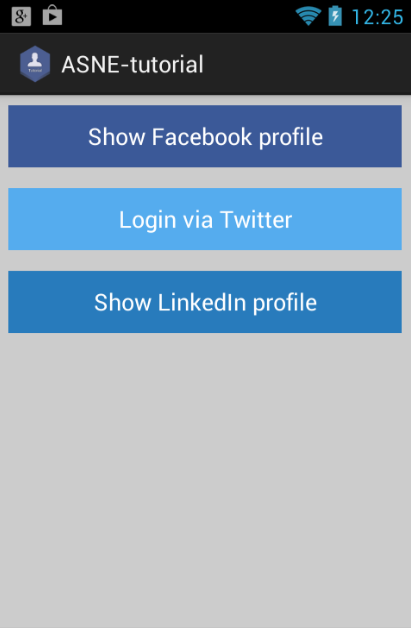
9. Request login for every social networks
```java
SocialNetwork socialNetwork = mSocialNetworkManager.getSocialNetwork(networkId);
socialNetwork.requestLogin();
```
Full `OnClickListener` loginClick with checking connection of social network and if social network connected - show `ProfileFragment.java` on click
**MainFragment.java**(full [source](https://github.com/gorbin/ASNETutorial/blob/master/app/src/main/java/com/github/gorbin/asnetutorial/MainFragment.java))
```java
private View.OnClickListener loginClick = new View.OnClickListener() {
@Override
public void onClick(View view) {
int networkId = 0;
switch (view.getId()){
case R.id.facebook:
networkId = FACEBOOK;
break;
case R.id.twitter:
networkId = TWITTER;
break;
case R.id.linkedin:
networkId = LINKEDIN;
break;
}
SocialNetwork socialNetwork = mSocialNetworkManager.getSocialNetwork(networkId);
if(!socialNetwork.isConnected()) {
if(networkId != 0) {
socialNetwork.requestLogin();
MainActivity.showProgress(socialNetwork, "Loading social person");
} else {
Toast.makeText(getActivity(), "Wrong networkId", Toast.LENGTH_LONG).show();
}
} else {
startProfile(socialNetwork.getID());
}
}
};
```
10. After social network login form we got callback `onLoginSuccess(int networkId)` or `onError(int networkId, String requestID, String errorMessage, Object data)` - lets show profile if login success and show Toast on error
**MainFragment.java**(full [source](https://github.com/gorbin/ASNETutorial/blob/master/app/src/main/java/com/github/gorbin/asnetutorial/MainFragment.java))
```java
@Override
public void onLoginSuccess(int networkId) {
MainActivity.hideProgress();
startProfile(networkId);
}
@Override
public void onError(int networkId, String requestID, String errorMessage, Object data) {
MainActivity.hideProgress();
Toast.makeText(getActivity(), "ERROR: " + errorMessage, Toast.LENGTH_LONG).show();
}
private void startProfile(int networkId){
ProfileFragment profile = ProfileFragment.newInstannce(networkId);
getActivity().getSupportFragmentManager().beginTransaction()
.addToBackStack("profile")
.replace(R.id.container, profile)
.commit();
}
```
11. In `ProfileFragment.java` get networkId from `MainFragment.java`
**ProfileFragment.java**(full [source](https://github.com/gorbin/ASNETutorial/blob/master/app/src/main/java/com/github/gorbin/asnetutorial/ProfileFragment.java))
```java
public static ProfileFragment newInstannce(int id) {
ProfileFragment fragment = new ProfileFragment();
Bundle args = new Bundle();
args.putInt(NETWORK_ID, id);
fragment.setArguments(args);
return fragment;
}
@Override
public View onCreateView(LayoutInflater inflater, ViewGroup container, Bundle savedInstanceState) {
networkId = getArguments().containsKey(NETWORK_ID) ? getArguments().getInt(NETWORK_ID) : 0;
}
```
12. Now via `networkId` we can get social network and request current user profile like:
```java
socialNetwork = MainFragment.mSocialNetworkManager.getSocialNetwork(networkId);
socialNetwork.setOnRequestCurrentPersonCompleteListener(this);
socialNetwork.requestCurrentPerson();
```
don't forget to implement `OnRequestSocialPersonCompleteListener`
13. After completing request we can use SocialPerson dadta to fill our profile view
**ProfileFragment.java**(full [source](https://github.com/gorbin/ASNETutorial/blob/master/app/src/main/java/com/github/gorbin/asnetutorial/ProfileFragment.java))
```java
@Override
public void onRequestSocialPersonSuccess(int i, SocialPerson socialPerson) {
MainActivity.hideProgress();
name.setText(socialPerson.name);
id.setText(socialPerson.id);
String socialPersonString = socialPerson.toString();
String infoString = socialPersonString.substring(socialPersonString.indexOf("{")+1, socialPersonString.lastIndexOf("}"));
info.setText(infoString.replace(", ", "\n"));
Picasso.with(getActivity())
.load(socialPerson.avatarURL)
.into(photo);
}
@Override
public void onError(int networkId, String requestID, String errorMessage, Object data) {
MainActivity.hideProgress();
Toast.makeText(getActivity(), "ERROR: " + errorMessage, Toast.LENGTH_LONG).show();
}
```
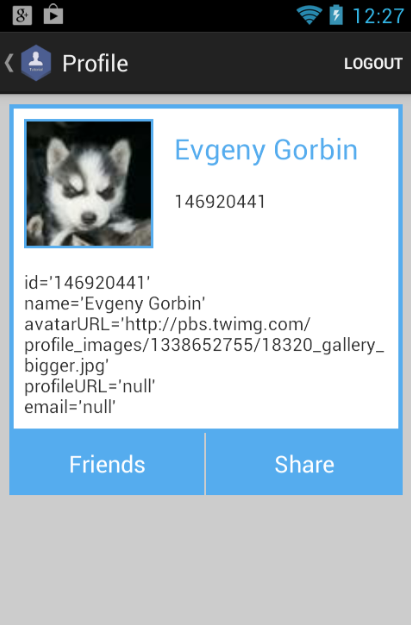
14. For logout you just need to use
```java
socialNetwork.logout();
getActivity().getSupportFragmentManager().popBackStack();
```
15. Truly, that's all - we integrate Facebook, Twitter and Linkedin and get user profile. You can add other social networks like Instagram or Google Plus just adding dependency for them and adding them to `SocialNetworkManager` like in step 8:
```java
GooglePlusSocialNetwork gpNetwork = new GooglePlusSocialNetwork(this);
mSocialNetworkManager.addSocialNetwork(gpNetwork);
InstagramSocialNetwork instagramNetwork = new InstagramSocialNetwork(this, INSTAGRAM_CLIENT_KEY, INSTAGRAM_CLIENT_SECRET, instagramScope);
mSocialNetworkManager.addSocialNetwork(instagramNetwork);
```
And of course you can use any other request which we use bellow for them
14. In this tutorial we make some more requests **Share link** and **Get user friendslist**
Let's **share** simple link via social network:
* Setup share button
```java
share = (Button) rootView.findViewById(R.id.share);
share.setOnClickListener(shareClick);
```
* To share we need fill bundle and just request post link
```java
Bundle postParams = new Bundle();
postParams.putString(SocialNetwork.BUNDLE_LINK, link);
socialNetwork.requestPostLink(postParams, message, postingComplete);
```
* And of course some actions to callback
```java
private OnPostingCompleteListener postingComplete = new OnPostingCompleteListener() {
@Override
public void onPostSuccessfully(int socialNetworkID) {
Toast.makeText(getActivity(), "Sent", Toast.LENGTH_LONG).show();
}
@Override
public void onError(int socialNetworkID, String requestID, String errorMessage, Object data) {
Toast.makeText(getActivity(), "Error while sending: " + errorMessage, Toast.LENGTH_LONG).show();
}
};
```
* So `OnClickListener` shareClick is
**ProfileFragment.java**(full [source](https://github.com/gorbin/ASNETutorial/blob/master/app/src/main/java/com/github/gorbin/asnetutorial/ProfileFragment.java))
```java
private View.OnClickListener shareClick = new View.OnClickListener() {
@Override
public void onClick(View view) {
AlertDialog.Builder ad = alertDialogInit("Would you like to post Link:", link);
ad.setPositiveButton("Post link", new DialogInterface.OnClickListener() {
public void onClick(DialogInterface dialog, int id) {
if(networkId != MainFragment.TWITTER){
Bundle postParams = new Bundle();
postParams.putString(SocialNetwork.BUNDLE_LINK, link);
socialNetwork.requestPostLink(postParams, message, postingComplete);
} else {
socialNetwork.requestPostMessage(message + " " + link, postingComplete);
}
}
});
ad.setNegativeButton("Cancel", new DialogInterface.OnClickListener() {
@Override
public void onClick(DialogInterface dialog, int i) {
dialog.cancel();
}
});
ad.setOnCancelListener(new DialogInterface.OnCancelListener() {
public void onCancel(DialogInterface dialog) {
dialog.cancel();
}
});
ad.create().show();
}
};
private AlertDialog.Builder alertDialogInit(String title, String message){
AlertDialog.Builder ad = new AlertDialog.Builder(getActivity());
ad.setTitle(title);
ad.setMessage(message);
ad.setCancelable(true);
return ad;
}
```
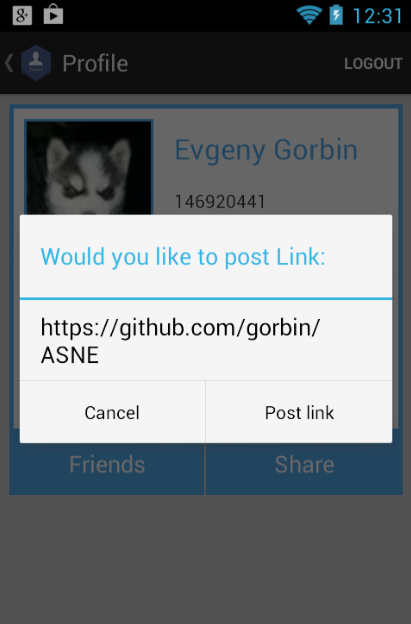
Here we make standard alert dialog to notify user that we want to share link and in PositiveButton we check if it is not Twitter(there are no method in twitter api to post link, but we can post message as message + link)
Let's get **friendslist** via social network:
* Get social network id
* Get `SocialNetwork` from Id and request get freinds
```java
SocialNetwork socialNetwork = MainFragment.mSocialNetworkManager.getSocialNetwork(networkId);
socialNetwork.setOnRequestGetFriendsCompleteListener(this);
socialNetwork.requestGetFriends();
```
don't forget to implement `OnRequestGetFriendsCompleteListener`
* Get response
```java
@Override
public void OnGetFriendsIdComplete(int id, String[] friendsID) {
((MainActivity)getActivity()).getSupportActionBar().setTitle(friendsID.length + " Friends");
}
@Override
public void OnGetFriendsComplete(int networkID, ArrayList socialPersons) {
MainActivity.hideProgress();
FriendsListAdapter adapter = new FriendsListAdapter(getActivity(), socialPersons, networkID);
listView.setAdapter(adapter);
}
@Override
public void onError(int networkId, String requestID, String errorMessage, Object data) {
MainActivity.hideProgress();
Toast.makeText(getActivity(), "ERROR: " + errorMessage, Toast.LENGTH_LONG).show();
}
```
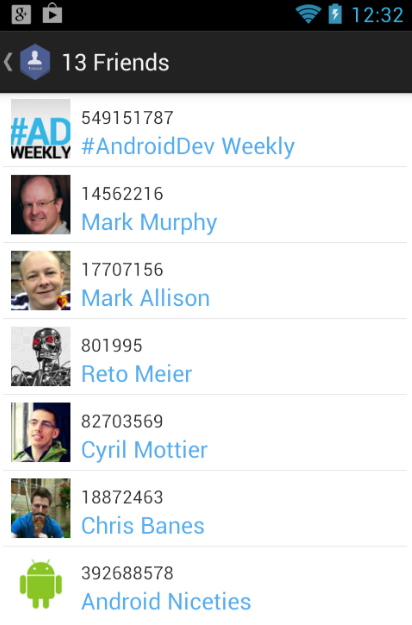
More detailed you can read in [**FriendsFragment.java**](https://github.com/gorbin/ASNETutorial/blob/master/app/src/main/java/com/github/gorbin/asnetutorial/FriendsFragment.java)
##Conclusion
Using ASNE modules you can easily and quickly integrate any popular social networks and use common requests in your app. Of course library got [more methods](https://github.com/gorbin/ASNE/wiki/SocialNetwork-methods) which you can use in your application. But in case if you want to use social network methods from SDK or API you can easily get accesstokens or get instancesof main object in your App
This is simple tutorial demom if you need more complex - [check ASNE demo app](https://github.com/gorbin/ASNE)
Source code:
[Zip](https://github.com/gorbin/ASNETutorial/archive/master.zip)